

M4 Pro Mac mini - and making it work for me!
It’s still the Mac I do most of my work on…but now with a little bit of help

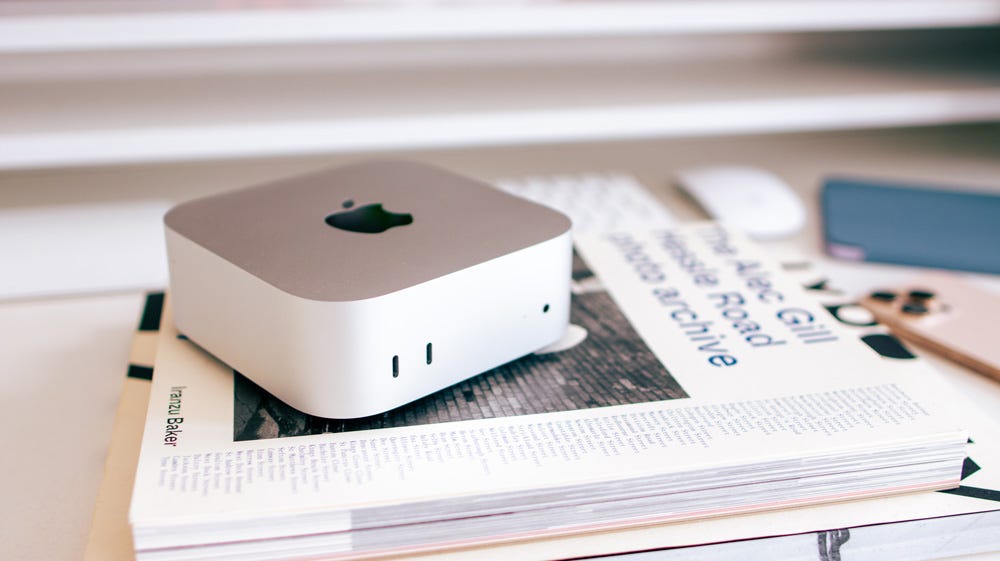
I got my M4 Pro Mac mini within a few days of its release. It’s still the Mac I do the majority of my work on.
I write these stories on it, run my business from it, and do the majority of my editing on it. And after eighteen months of daily use, I’m still delighted with it overall.
It sits neatly in the corner of my desk and quietly and efficiently goes about its business.
When I bought it, I knew it was going to be a worker - in other words, not a Mac that I was buying to review. This was going to be my studio-slogger, and it has not let me down.
I have it paired to a 1st Gen Studio Display and another secondary display. Other than that, I have a couple of audio interfaces connected, a hub with loads of I/O, an SD card reader and, of course, some external storage. It’s also connected directly to a NAS, which I’ll tell you about later.
I spec’d my M4 Pro Mac mini well! As I’ve already mentioned, I went with the Pro chip, 48GB of memory, 1TB of storage and beefed it up with a 14-core CPU/20-core GPU chip.
A late addition to the tick-box list was to get the 10Gb Ethernet port built into it. I had an inkling that at some point down the line, I’d end up using it - and so it’s proven to be.
I ended up spending over £2000 on the mini - but it has earned me that back and then some. It was money well spent.
M4 Pro Mac mini - good but…
You know my feelings on clickbait and attention-grabbing headlines, so let me just say this right away - I have zero regrets about buying the Mac mini.
Admittedly, if I were spending the money again, I’d probably get a Mac Studio, but even so, the mighty mini has never grumbled, stumbled or let me down.
If you were wondering, yes, I’m one of the leave it on gang!
I have virtually never turned the Mac mini off. It runs 24/7 - that is, until recently. During the height of our recent heatwave, it was hot - seriously hot. OK, my studio is not air-conditioned, and it was hovering at around 35 degrees for a few consecutive days, so the fact that the Mac mini carried on working as normal was in itself impressive.
If the fan has ever kicked in, I can’t recall it, and that’s even when it’s handling chunky 10-bit, 4K video timelines in Final Cut - which it does effortlessly. I think when I checked it against my M1 Max MacBook Pro for export times for a 10-minute video, they were more or less the same.
Pretty impressive, right?
This latest iteration of the Mac mini is impressive and again goes to show what Apple silicon is capable of. In the early days, it wasn’t unusual for me to pack the mini up at the end of the day and carry on working on it from home. Assuming you have a monitor, keyboard & mouse at the other end, this thing is ultra-portable too, adding to its already impressive credentials.
As competent as the mini is, though, probably its biggest weakness is the I/O. It’s good but limited. All you get on the front is a couple of slow USB-C ports. Things improve on the back, though, where we get those three blazing-fast Thunderbolt 5 ports, an HDMI port and that Ethernet port, which, as I mentioned, I had upgraded.
I have one of those Thunderbolt 5 ports permanently hooked up to an external enclosure that houses 4TB of Samsung Pro NVME storage. As this is essentially a desktop Mac, having some external storage connected is no hardship. Mine is tucked out of sight - I never see it, and it means that even after all those months of hard use, I’ve still only used 400GB of its 1TB internal storage.
And being Thunderbolt 5, you honestly don’t notice the difference in speeds when working from the external SSD to that of the Mac itself.
One thing that hasn’t changed is Apple’s greed for their storage upgrades, though. To go from 1TB to 2TB with Apple, you’d pay £400 at checkout, whereas I could buy 1TB of Samsung 990 Pro NVME storage for £200. It’s criminal, it really is. Even with the massive hikes in storage costs this year, I can still buy storage at half the price that Apple would charge me.
I know you need to buy a good enclosure, but that’s a one-off cost, and it also means that your storage is portable and modular. You can use it on any of your Macs.
But recently I’ve started to cash in my chips on that £100 extra that I paid for that 10Gb Ethernet port.
I’ve entered the world of Network Attached Storage.
The NAS connection
External NVME storage is all well and good, but of course, you need to have it with you, whereas a NAS is accessible from anywhere.
When I bought this Mac mini, I had heard about NAS storage, and it intrigued me. I knew next to nothing about it, but things have changed. I’m now a paid-up fan and member of the NAS fan club.
While I don’t understand and don’t really want to understand all the finer details about how they work, what I can tell you is that using a NAS with my Mac mini over this past year has been a revelation to me - and it’s fun too.
I have my NAS connected directly to my Mac mini via that 10Gb Ethernet port for the fastest possible speeds between the Mac and the NAS. If you are new to NAS, think of a NAS as your own Dropbox - it’s like a private cloud.
The biggest wins I’ve found, though, are cost, speed and privacy.
Starting with the cost. This year, I spent £125 on 3TB of cloud storage with Dropbox, and that’s a year-on-year cost. I also pay for 2TB of iCloud Storage as well. All these costs start to add up. With a NAS, yes, you have some upfront costs, but after that, you start to quickly recoup the cash.
I’ve also found that the speed of downloading and certainly uploading to a NAS is far quicker as well, even if I’m doing it remotely. I don’t know why, but it is.
And although cloud storage is pretty secure, nothing can beat you being the one who sets the restrictions and privacy settings. You are the only one who decides who gets to see your data. That’s something else that I like.
The beauty of a NAS is, of course, that it’s accessible anywhere. When I’ve been away on a day’s photo shoot, the first thing I always do when I get back to my room is upload that day’s work to the NAS from my MacBook Neo. That way, I know it’s safe no matter what happens to the SD card.
Apart from the basics of having general documents, emails and PDFs on it, I also create links and share files from the NAS. Now that I’ve started to use it, I’m finding more and more benefits from using one.
The NAS and me
In my pre-NAS days, I used to have to upload all the photos from a session to Lightroom to go through them and decide which were the keepers and which weren’t.
Not only was that slow and doubling my workload, but my Adobe storage was filling up damned quickly, too. Recently, though, when I’m in the studio, I’ve realised I can access all my photos on the NAS as the Mac sees it as a local folder from within Lightroom.
So now I can look through all the images there in that local folder and edit them too. Once I’m done, I can then send just that one finished edit to Lightroom in the cloud, which saves me both time and money.
And remotely, I now have access to all my photos on the NAS, so again, I can go through and pick and choose which ones I like and just download that image ready to edit in Lightroom.
The other huge benefit is that a NAS is basically a server, meaning it can be used as a media server. I have a massive vinyl collection that has all been ripped to 44.1 WAVs, but until recently, they were just sitting in Dropbox, effectively gathering dust. I wasn’t getting to use and enjoy them. Cloud storage is not a media server.
But my NAS has a music app, and it is brilliant!
I can now sit at my Mac all day long, working, playing my vinyl as full albums from start to finish just like the artist had intended. The media player is designed to play and treat albums just like Apple Music or Spotify would. I can even add metadata and album art. Day by day, I’m adding two or three more albums to the NAS, and I’m having the time of my life doing it.
The studio is again full of the cool sounds of my rare groove collection. One of those audio interfaces I mentioned has a pair of powered studio monitors attached.
If you ask me, life’s too short for bad audio!
And I’m doing all this whilst not touching the storage on my Mac mini, and I can play my music anywhere - even in the car! At home, I now play albums from my NAS to my HomePods. I’m like a kid with a new toy, and I can’t get enough of it!
All of this works so well with the Mac mini in particular, because I had the foresight to spend £100 more and get that 10Gb Ethernet port.
Now Ive just started to rip some DVDs onto my Mac and then into the Theatre app on my NAS. I’ve only done one so far, but at least I’ve made a start. It seems to be a slowish process, but it works seamlessly, and I can already see the benefits. Once you buy into the notion of a NAS, the uses for it are endless.
The 3-2-1 solution
I store as little as possible on my Mac mini, full stop, and certainly, precious files are never solely stored on it.
I’m upping my backup game at the moment, too, by using the trusted 3-2-1 approach. I now have three copies, on two devices and one of those is air gapped.
Because using a NAS with my Mac mini has proven such a win, I’m about to implement another NAS in my workflow. I’m going to have a NAS at home and at the studio, and using the sync & backup facility, I intend to have them talk to one another.
Although my MacBook Pro doesn’t have a fast 10Gb port, the Ivanky hub I have it connected to does, so hopefully it’ll work well there too. I’m honestly excited by the prospects.
As for the air-gapped part of it, I’m being very selective about that, because as you doubtless know, it’s a pretty slow process uploading big files, and also I don’t want to incur any more costs.
For the time being, I’m uploading the latest couple of batches of photo shoots and some documents to Google Drive. I’m just using the standard 15GB that comes free with Google, which is ample. Again, there’s an app on my NAS that makes that straightforward too.
If you’re interested, I’m using a NAS from UGREEN, but I guess they all work in a similar way.
Happy days
The Mac mini is impressive. Since I started using it, my workflow has drastically changed. I’m now editing CR3 Canon files in Lightroom and 10-bit 4K Canon files in Final Cut, but the M4 Pro Mac mini just keeps up with whatever I throw at it.
Where I had possibly been reaching its limits, though, adding a NAS to the Mac mini has given it another lease of life.
This workflow is probably the best I’ve ever had from both a productivity and redundancy standpoint. And as it turns out, that £100 I spent on that 10Gb port was quite likely the best £100 I’ve spent in a very long while.
It turns out that the M4 Pro Mac mini and my NAS are perfect partners!
Originally published at https://talkingtechandaudio.com on June 4, 2026.